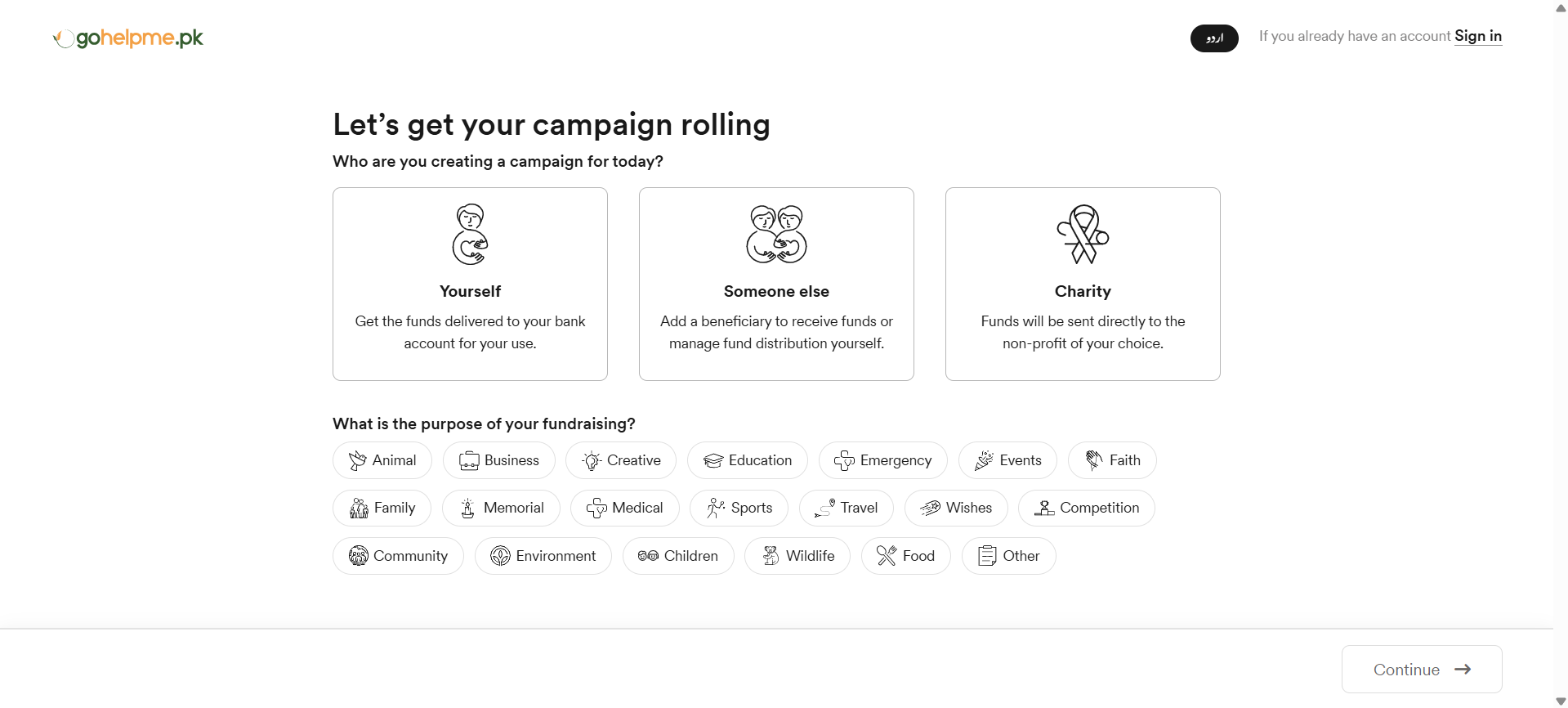
If you are searching for how to create a campaign on Gohelpme.pk or want to start a fundraising campaign on Gohelpme.pk, this guide will help you understand the complete process in simple steps. Whether you want to raise funds for yourself, someone else, or a registered charity, Gohelpme.pk makes it easy to create and publish your campaign quickly.
Follow the steps below to create your campaign and start receiving donations.
Step 1: Click on the Start a Campaign Button
To begin creating your fundraiser on Gohelpme.pk, click on the Start a Campaign button. You can find this button on the top-right side of the navigation bar (navbar), as well as in several other sections across the website for easy access.
Step 2: Choose who you are creating the campaign for
Yourself
Select this option if you want to create a campaign for yourself or raise funds on behalf of someone else. In both cases, all donations received through the campaign will be transferred directly to your bank account, and you will be responsible for managing and utilizing the funds for the stated purpose.
Someone Else
Select this option if you are creating a campaign for a friend, family member, or any other individual. In this case, you will act as the campaign manager, while the beneficiary will be the person receiving the support. You will need to add the beneficiary details to the campaign, and all donated funds will be transferred directly to the beneficiary’s bank account, whether it belongs to a friend, family member, or any other person you are helping.
Charity
Select this option only if you are a registered nonprofit organization in Pakistan. You should also be an authorized representative of the organization and have full access to the required documents for verification purposes.Step 3: Select campaign category
Choose a relevant category, such as Medical, Education, Emergency, or another cause related to your campaign. This helps users understand your purpose and improves visibility.Step 4: Set your fundraising goal
Enter the amount you want to raise. The goal can be between PKR 50 and PKR 1,000,000, depending on your requirement. If your goal has been reached, you can still continue raising funds, and you may also update the goal amount whenever needed.Step 5: Select your location
Choose your province, city, and area so your campaign can be easily identified and discovered by supporters.Step 6: Upload media
Gohelpme.pk allows organizers to upload either an image or link a YouTube video. You can choose only one option at a time. If you select an image as your media, then you should leave the YouTube video input empty.
Video
Only YouTube links are allowed. The video must be from your own official YouTube channel. Do not use videos from other channels.Image
Upload only relevant and real images related to your story. Do not use AI-generated, downloaded, or irrelevant images. Avoid uploading any sensitive personal information such as ID card numbers, bank details, or phone numbers.Step 7: Write a campaign title
Write a short and clear campaign title that explains your purpose. Do not include sensitive personal information such as phone numbers or ID card details.Step 8: Write a description
Explain your situation clearly and describe how the funds will be used. Keep it honest and simple. Do not include personal sensitive information such as phone numbers, ID card details, or bank account information.Step 9: Review your campaign
Click on “Review & Publish” to see how your campaign will appear publicly on Gohelpme.pk. Carefully check all details before proceeding.Step 10: Publish your campaign
Click the “Publish” button to submit your campaign for review and approval.