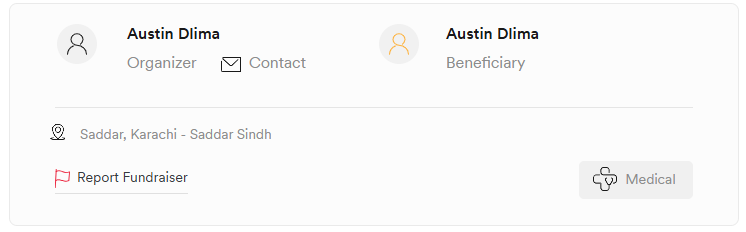
Gohelpme.pk allows supporters and visitors to contact campaign organizers directly through the campaign page when the contact option is available. This can be useful if you have questions about a campaign, need additional information, or would like to communicate with the organizer.
How to Contact a Campaign Organizer
Step 1: Open the Campaign
Go to the campaign you would like to contact the organizer about and open the campaign page.
Step 2: Find the Contact Option
On the campaign page, locate the Contact option available below the organizer's name.
Click on Contact to open the contact form.
Step 3: Enter Your Details
Fill in the required information:
- Name
- Email Address
- Message
Make sure the information you provide is accurate so the organizer can respond if needed.
Step 4: Complete Verification
Select the I'm not a robot verification checkbox.
Step 5: Send Your Message
Click the Send button to submit your message to the campaign organizer.
If You Cannot See the Contact Option
Some campaign organizers may choose not to receive direct messages through the platform. In such cases, the Contact option will not be displayed on the campaign page.
If the option is not visible, it means the organizer has not enabled direct contact for that campaign. If you still need assistance or would like to get in touch regarding the campaign, you can contact the Gohelpme.pk Team at support@gohelpme.pk. Our team will review your request and guide you further where possible.
Conclusion
Contacting a campaign organizer on Gohelpme.pk is simple when the contact feature is available. Just open the campaign, fill out the contact form, complete the verification step, and send your message.